MCP Server Configuration for GitHub Copilot Enterprise
Enterprise teams need to carefully balance Copilot's MCP server power with security guardrails.
MCP is short for Model Context Protocol, and it's an open standard for how applications share context with large language models. GitHub's implementation lets repository administrators set up servers that Copilot cloud agent and Copilot code review can call on their own, with organization and enterprise administrators able to configure MCP servers separately as part of custom agents. That autonomy is the whole reason the configuration choices carry weight. Once a server is connected, Copilot uses its tools without asking permission for each individual call, so a server that's misconfigured can leak credentials, hand out tool access far wider than intended, or run entirely outside any governance boundary an organization thought it had in place. The practical reality for administrators is that MCP server configuration for Copilot cloud agent and Copilot code review lives at the repository level, while organization and enterprise levels supply policy controls, such as turning MCP on or off and, at the enterprise tier, allowlisting specific servers. That split, where the repository owns the details and higher scopes own the guardrails, is the frame everything else in this piece builds on.
Choosing between remote and local deployment before writing any configuration
Before a single line of JSON gets written, every MCP setup forces a choice between two deployment patterns: remote or local. A remote server runs somewhere outside the developer's machine, and you reach it over a network connection. A local server runs as a command on the same machine Copilot is operating from, invoked directly. This decision determines the transport type, which authentication methods are even on the table, and which tools exist to enforce policy on top of the connection. It has to happen first, because everything downstream, from how credentials get passed to how an enterprise allowlist matches the server, depends on which path was chosen.
One constraint narrows the field immediately: Copilot cloud agent and Copilot code review do not currently support remote MCP servers that use OAuth for authentication and authorization. That rules out a popular modern authentication pattern for these two Copilot features specifically, and it shapes which authentication approaches are realistically available at the repository level.
The official GitHub MCP server shows the fork directly, because its setup steps differ depending on which path you choose. The remote version runs over HTTP or SSE and authenticates with a Bearer token passed in a header. The local version runs through direct command invocation instead. Editor support adds its own version requirements on top of this. Remote MCP in Visual Studio needs Visual Studio 2026 or Visual Studio 2022 version 17.14, and VS Code needs version 1.101 or later for remote MCP and OAuth support. Pick the deployment pattern first, confirm the tooling actually supports it, and only then move to writing configuration, because the deployment pattern constrains every decision that follows it.
Writing the JSON configuration correctly at the repository level
Repository-level MCP configuration in GitHub Copilot Enterprise follows a specific JSON structure, and getting that structure wrong, through an ambiguous tool scope or a missing key, causes either a validation failure or, worse, autonomous tool access nobody intended to grant. The configuration lives under the repository's Settings, then Copilot, then MCP servers, and at its core it's a single JSON object called mcpServers. Each key inside that object is a server name chosen by the administrator, and each value is a configuration object describing that specific server.
Every server, regardless of deployment pattern, needs two things: a tools array listing which tool names are enabled (or the wildcard * to enable all of them), and a type field identifying the server kind. From there the required keys split by deployment pattern. A local server is invoked as a process, so it needs a command and an args array, with an optional env object for environment variables. A remote server needs a url, with optional headers for things like authentication tokens.
Copilot code review adds one more requirement on top of this. For a tool to be usable in code review, that tool's entry in the MCP server's tools/list response has to set annotations.readOnlyHint to true. Any tool missing that annotation, or with it set to false, simply gets excluded from code review use, which keeps code review limited to invoking tools that only read.
You reference secrets inside this JSON by substituting variables, so you never type them directly into the file. The supported syntax is $VAR, ${VAR}, and ${VAR:-default}, all of which GitHub resolves at runtime. Only Agents secrets and variables with names prefixed COPILOT_MCP_ are accessible to MCP configuration, and that sets up the credential-handling discipline the next section covers in full.
Handling credentials without hardcoding them into configuration files
Every credential an MCP server needs, whether it's an API key, a connection variable, or a secret token, has to flow through the COPILOT_MCP_-prefixed Agents secrets and variables namespace. Any other pattern, including a hardcoded value sitting in a configuration file that gets committed to the repository, defeats the security model this whole system depends on. When a server requires a variable, key, or secret, the administrator adds an Agents secret or variable whose name carries that COPILOT_MCP_ prefix, and only secrets and variables with that exact prefix become available for MCP configuration to reference. Anything named without it stays invisible to MCP, by design.
The remote GitHub MCP server, used through VS Code or Visual Studio, authenticates with a Bearer token sent in an Authorization header, formatted as Bearer YOUR_GITHUB_PAT. That token is a personal access token, and personal access tokens come with their own obligations around rotation and scoping that don't disappear just because the token works. A PAT pasted into a config once and never rotated again is a liability sitting in plain sight.
Several patterns should be treated as flatly disqualifying. Hardcoded credentials inside MCP configuration files that get committed to a repository expose those credentials to anyone with read access to the repo's history. Shared credentials reused across multiple MCP servers or multiple agents mean a single leak compromises every system touching that credential, not just one. Long-lived OAuth refresh tokens stored in plain text configuration sit there indefinitely, available to anyone who can read the file, with no expiration forcing a reset. Static connection strings embedded directly in an MCP server's manifest carry the same exposure as hardcoded credentials, just under a different name.
The underlying protocol has been tightening its own rules around this. In its June 2025 revision, the MCP authorization specification formally classified MCP servers as OAuth resource servers, a distinction that separates them from authorization servers. Under that model, an MCP server only validates tokens that a separate authorization server issued, with that authorization server able to be co-hosted with the MCP server or run entirely externally, and login management handled by that separate authorization server. The July 2026 revision went further, adding client-side validation of the issuer identifier (the iss field) under RFC 9207 to guard against mix-up attacks, requiring clients to declare their OIDC application_type during registration, and adding refresh token guidance under SEP-2207. That guidance clarifies that clients can request refresh tokens through the offline_access scope when the authorization server advertises support for it, but MCP servers themselves should not advertise offline_access as a resource scope. The direction of travel across both revisions is the same: push credential issuance and validation into dedicated, auditable channels, keeping it fully out of configuration files.
Scaling configuration from repository to organization to enterprise scope
A single repository's MCP configuration is one thing. Governing MCP across dozens or hundreds of repositories is a different problem, and it requires a deliberate decision about which scope level owns each policy, because settings made at a higher scope can lock out overrides at a lower one, or deliberately permit them. Getting that ownership question wrong either leaves repository admins free to do things the enterprise never intended to allow, or locks down teams that need flexibility the policy wasn't designed to block.
Mechanically, repository administrators still do the detailed configuration work, through the repository's Settings → Copilot → MCP servers page, using the JSON format already described. Organization and enterprise administrators work at a different altitude: they can configure MCP servers as part of custom agents using YAML frontmatter, which operates above the repository-level JSON.
The gating policy sits above both. The "MCP servers in Copilot" policy is disabled by default for both Copilot Business and Copilot Enterprise, so enterprise and organization owners have to explicitly turn it on before any MCP configuration underneath it takes effect. Copilot Free, Pro, Pro+, and Max plans are not governed by this policy.
IDE-level configuration adds its own scope layering on top of repository and organization settings. Visual Studio reads mcp.json files from multiple locations in a defined order, starting with a global per-user file at %USERPROFILE%\.mcp.json. VS Code supports both a repository-scoped .vscode/mcp.json and a personal settings.json configuration, and defining the same server in both places at once can produce conflicts between them.
But you need a direct status check on one more mechanism before you build production policy around it. A custom MCP registry approach exists, where an administrator configures a registry URL and sets the policy to "Registry only," available at both enterprise and organization scope. That approach is currently in public preview, and it is not the recommended method for restricting which servers get used. If you want the generally available method built for production enforcement, you need the managed-settings allowlist covered next.
Enforcing an enterprise-wide MCP allowlist through managed settings
If you want to control which MCP servers run across an entire enterprise's Copilot clients, you use a pair of keys, allowedMcpServers and deniedMcpServers, set inside copilot/managed-settings.json. Enterprise owners add either or both keys to that file in the source organization's .github-private repository, and once the change is committed to the default branch, the policy takes effect immediately for every developer across the enterprise.
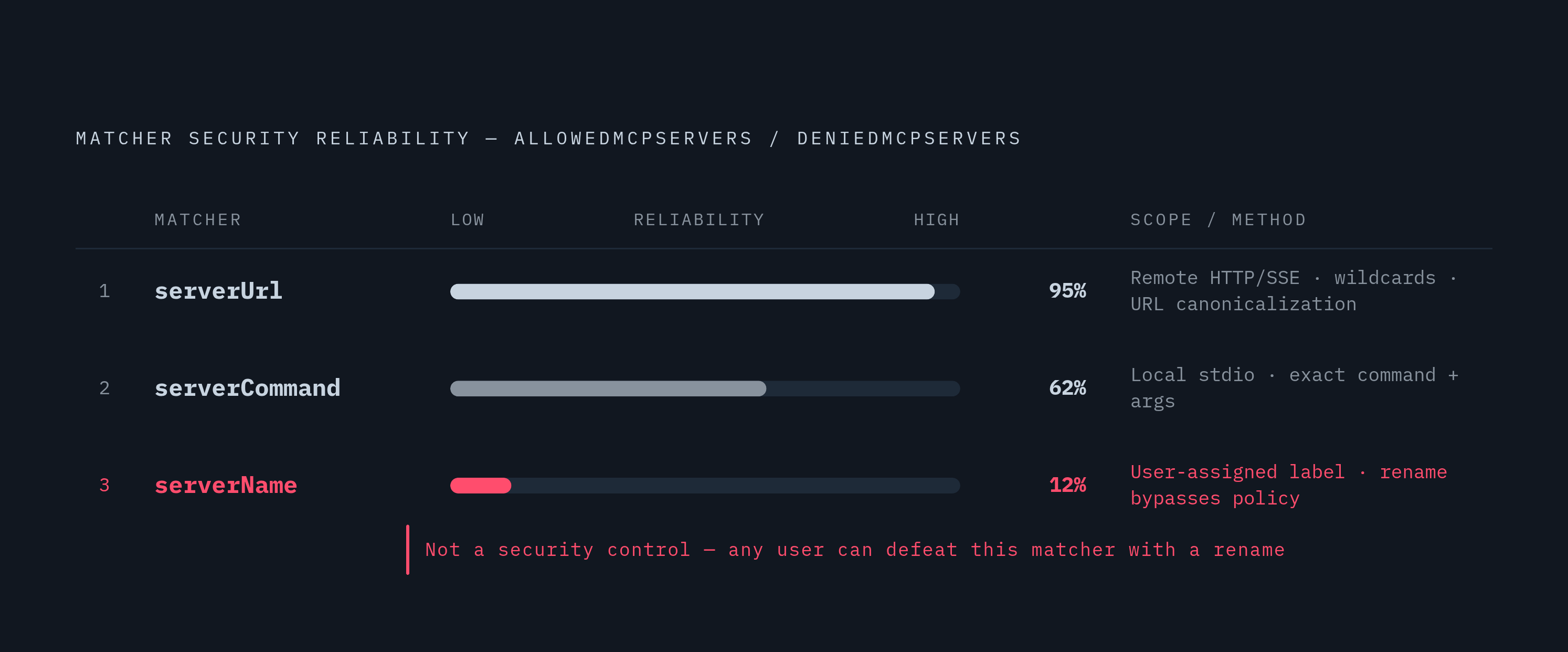
Each key holds a list of matchers, and three different matcher types exist for identifying a server, each with a different level of security reliability. serverUrl matches remote, HTTP or SSE, servers, supports wildcard characters, and canonicalizes URLs so a server can be matched reliably even when its address is reformatted in a trivial way. serverCommand matches local, stdio, servers by exact command and argument string. serverName matches the label a user assigned to the server when they set it up, and that distinction matters: serverName exists purely as a convenience for humans reading a policy file, not as a security control, because any user can rename a server to whatever they want. An allowlist or denylist built around serverName alone can be sidestepped by a rename; one built around serverUrl or serverCommand identifies the server by what it actually is, so it holds even through a rename.
These policies are built to fail closed. If a configuration entry is malformed or can't be verified, it gets blocked rather than let through on the assumption that it's probably fine.
That's the mechanism for giving different teams specialized policy without surrendering central governance over the baseline itself. As of now, enforcement applies to the GitHub Copilot app, Copilot CLI, and VS Code.
Controlling what agents can do once they are connected
Getting a server onto the allowlist is not the same as trusting everything that server's tools can do.
Enterprise managed permissions for agent operations, added in September 2026, give enterprise and Copilot Business administrators centralized control over three categories of agent behavior: shell commands, file reads and edits, and network domains. Each operation inside those categories can be set to one of three states: blocked, requiring human approval before it runs, or proceeding without any prompt. Managed restrictions set this way can't be weakened by a user's personal settings, by workspace-level settings, by auto-approval features, or by approvals a user saved from some earlier session.
That enterprise-level control pairs with a repository-level habit that matters just as much. For the tools field in repository configuration, the sound practice is allowlisting specific, read-only tools rather than enabling everything at once with the * wildcard, because the agent acts autonomously on whatever tools are enabled, without pausing to request approval before each one. Scoping tools precisely at configuration time is the first real line of control over what an agent can do, and it's the decision an administrator makes before the enterprise-level permission categories ever get a chance to step in.
Sources
- Configure MCP servers for your repository - GitHub Docs
- Use MCP Servers to Extend GitHub Copilot - Visual Studio (Windows)
- Restrict MCP server access to a custom registry - GitHub Docs
- Extending GitHub Copilot Chat with Model Context Protocol (MCP) servers - GitHub Docs
- GitHub - github/github-mcp-server: GitHub's official MCP Server · GitHub
- Enterprise managed settings - GitHub Docs
- MCP allowlists in enterprise managed settings - GitHub Changelog