MCP Client Comparison for Enterprise Integration
Four MCP client types solve different problems; pick your constraint before comparing vendors.

MCP client selection comes down to four questions most teams skip: who does the agent act as, what gets blocked before it happens, what gets logged after, and whether any of that holds up once more than one person is using it. This piece walks through the differences that actually matter, because the protocol itself doesn't answer them. MCP gave agents a common way to call outside tools instead of writing a new connector for every SaaS product, and it caught on fast. Every major platform vendor picked it up inside two years. Gartner expects a sharp jump in enterprise apps wired into task-specific agents by the end of 2026, and most of that traffic will run over MCP.
The protocol was built loose on purpose, and that looseness is exactly why it spread so fast. But auth, permissions, and logging were never guaranteed by the spec itself; somebody still has to build all of that. The NSA's Artificial Intelligence Security Center said as much in a May 2026 advisory, comparing MCP's path to early web protocols: adoption got ahead of the security model, and now everyone's playing catch-up. Whoever writes the client sitting between your agent and the MCP server decides how much of that catching-up lands on your team.
The four categories of MCP clients and what each one is actually built for
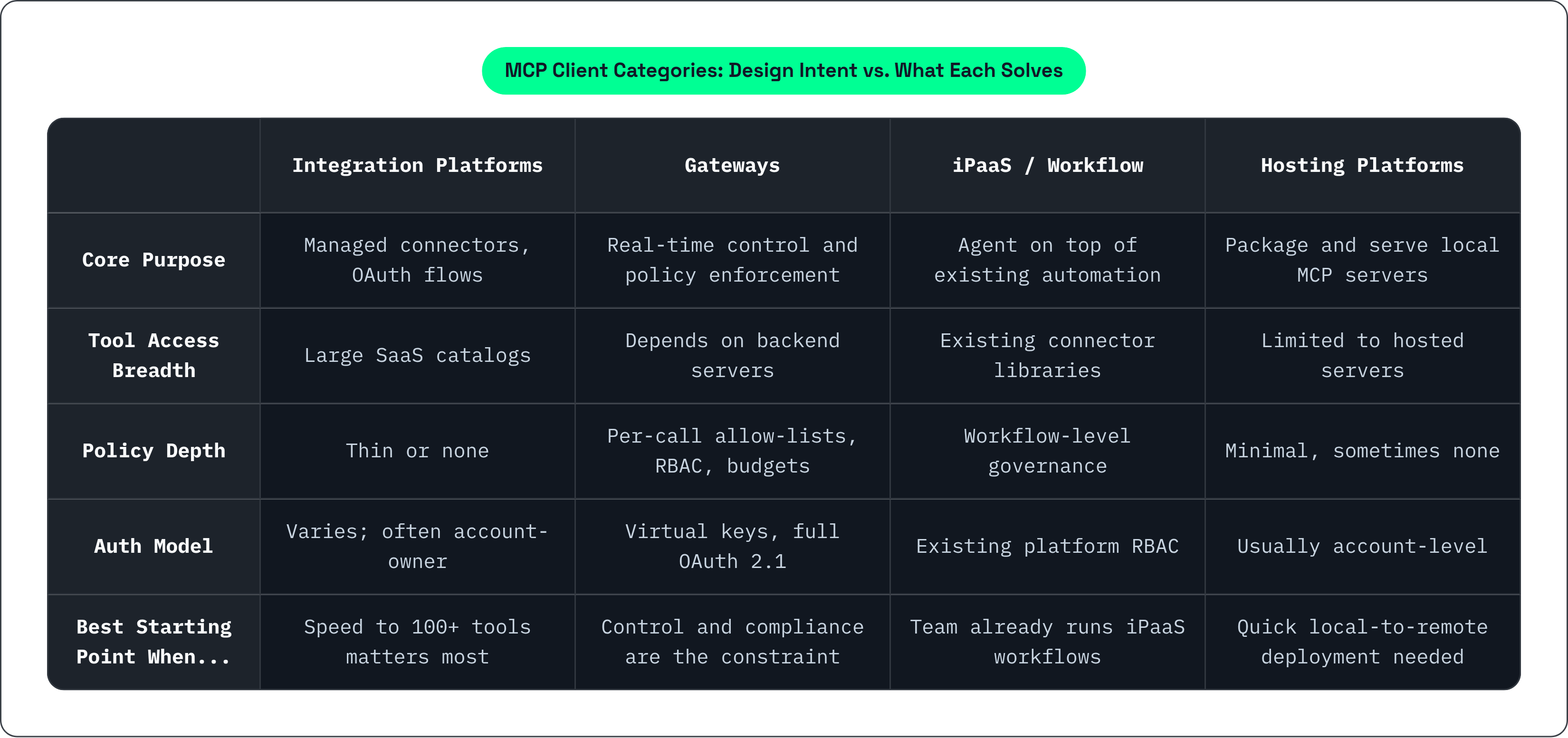
Four types of MCP clients exist right now, and I've spent enough time poking at each to say they solve genuinely different problems.
Integration platforms hand agents managed connectors and OAuth flows, with big SaaS catalogs so an agent can reach a hundred tools fast. Gateways sit as proxies between agent and server; their whole job is control, meaning what gets allowed, what gets logged, what gets blocked. iPaaS and workflow platforms bolted MCP onto tools that already ran business process automation. Deployment and hosting platforms package local STDIO-based MCP servers and serve them remotely, usually with a thin governance layer, sometimes with none at all.
A team that needs tool-call-level policy enforcement won't get much out of a 500-connector catalog if the platform has no per-user auth. And a team trying to get an agent talking to Salesforce and Slack by Friday isn't going to sit around reading a gateway's routing docs.
The lines blur constantly, too. Vendors drift between categories, bolting a gateway layer onto a connector catalog, or a hosting layer under an iPaaS tool. Treat these four as design intent, not fixed walls, and figure out your actual constraint before you look at a single vendor. Breadth of tool access? Depth of policy enforcement? Workflow orchestration? Or just something hosted and running by today? Pick one. Everything downstream follows from that answer.
How credential handling and auth model determine who the agent is actually acting as
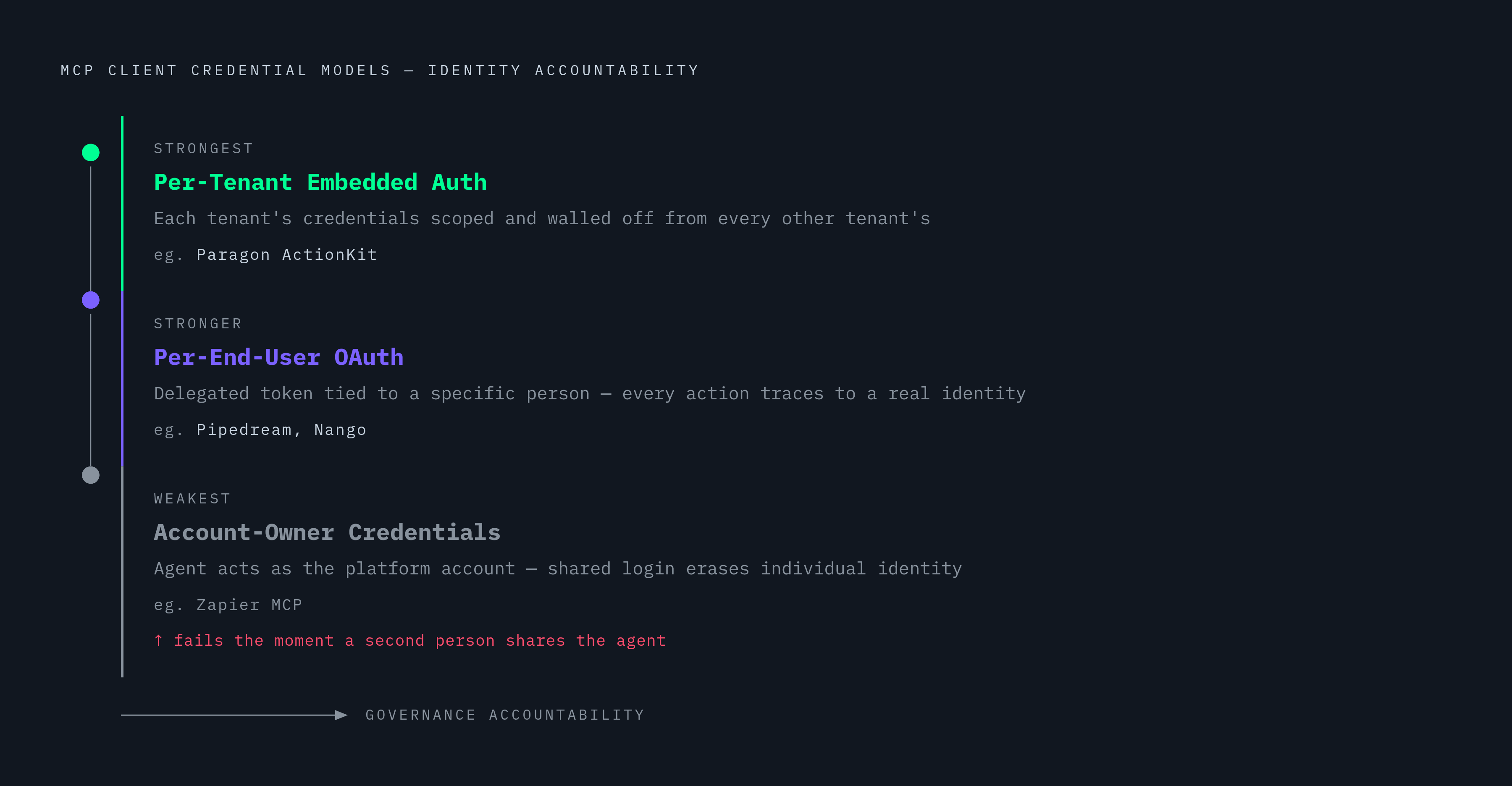
Whose credentials is the agent holding when it makes a call? That question decides more than most teams realize until something goes wrong.
Three models exist, and each comes with a real cost attached. Account-owner credentials are the simplest to wire up: the agent acts as the platform account, not as any one person. Fine if you're automating your own work solo. It turns into a governance hole the moment a second person shares that same agent. Per-end-user OAuth gives the agent a delegated token tied to a specific person, so every downstream action traces back to a real identity. Per-tenant embedded auth is built for products that put agents inside their own customer base, where each tenant's credentials stay scoped and walled off from every other tenant's.
Zapier MCP has the biggest tool catalog in the space, by a wide margin, but it runs on account-owner credentials with no per-end-user OAuth. Works fine for one person. Falls apart the moment a team shares the login. Pipedream and Nango both support per-end-user OAuth flows. Paragon's ActionKit was built specifically for per-tenant embedded auth, aimed at SaaS vendors putting agents into their own products.
The NSA's AISC called this out directly: MCP doesn't define how a session maps to a verifiable identity, and authentication is optional in the base spec. Whatever the protocol skips, the client has to supply.
SSO, SCIM, and just-in-time credential provisioning should be the baseline for any enterprise security team, yet most integration platforms in this space still don't check all three boxes.
What MCP gateways enforce that integration platforms leave open
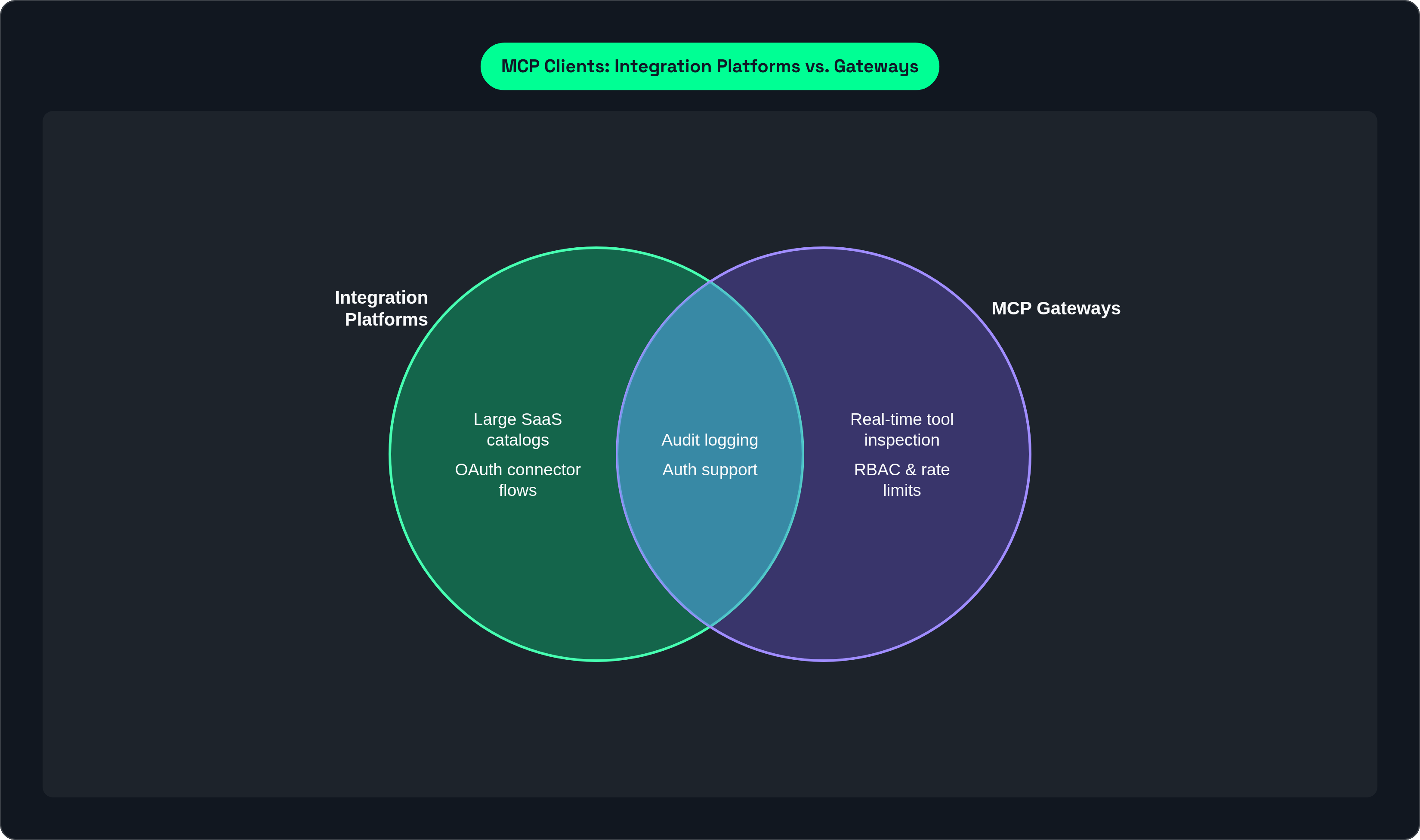
A gateway does more than check who's logged in. It inspects, permits, and logs every single tool call as it happens, in real time, not after the fact.
Six things matter when you're comparing gateways: latency added per request, deployment flexibility (self-hosted, in-VPC, air-gapped for regulated industries), the governance model itself (virtual keys, RBAC, budget and rate limits), protocol coverage (STDIO, HTTP, SSE, Streamable HTTP), how deep the OAuth support goes (full 2.1, PKCE, dynamic client registration), and whether it plays nice with the agent tools your team already runs, like Claude Desktop or Cursor.
A few names show what good looks like. Bifrost, from Maxim AI, is an HTTP gateway you run via Docker or a Go SDK; it uses virtual keys as its core governance unit, budgets cascade down a hierarchy, and per-key allow-lists control which tools get called. It plugs into HashiCorp Vault for secrets and produces audit logs formatted for SOC 2, GDPR, and HIPAA out of the box. Cloudflare bundles its AI Gateway, MCP Server Portals, and network Gateway into one security layer, which makes the most sense if you're already running on Cloudflare's edge. Azure API Management ships MCP gateway features tied to Entra ID RBAC, a natural pick if your shop already lives deep in Microsoft's stack. Lunar.dev's MCPX gives you access control lists at the global, service, and individual tool level. WSO2 offers a control plane for discovering and managing MCP servers, aimed at enterprises already running WSO2's API management tools.
Here's the blind spot almost every gateway shares, though. None of them look inside the actual content coming back from a tool call to check if it's adversarial. That's a different job, and it needs its own layer.
The security threats that no amount of policy configuration prevents on its own
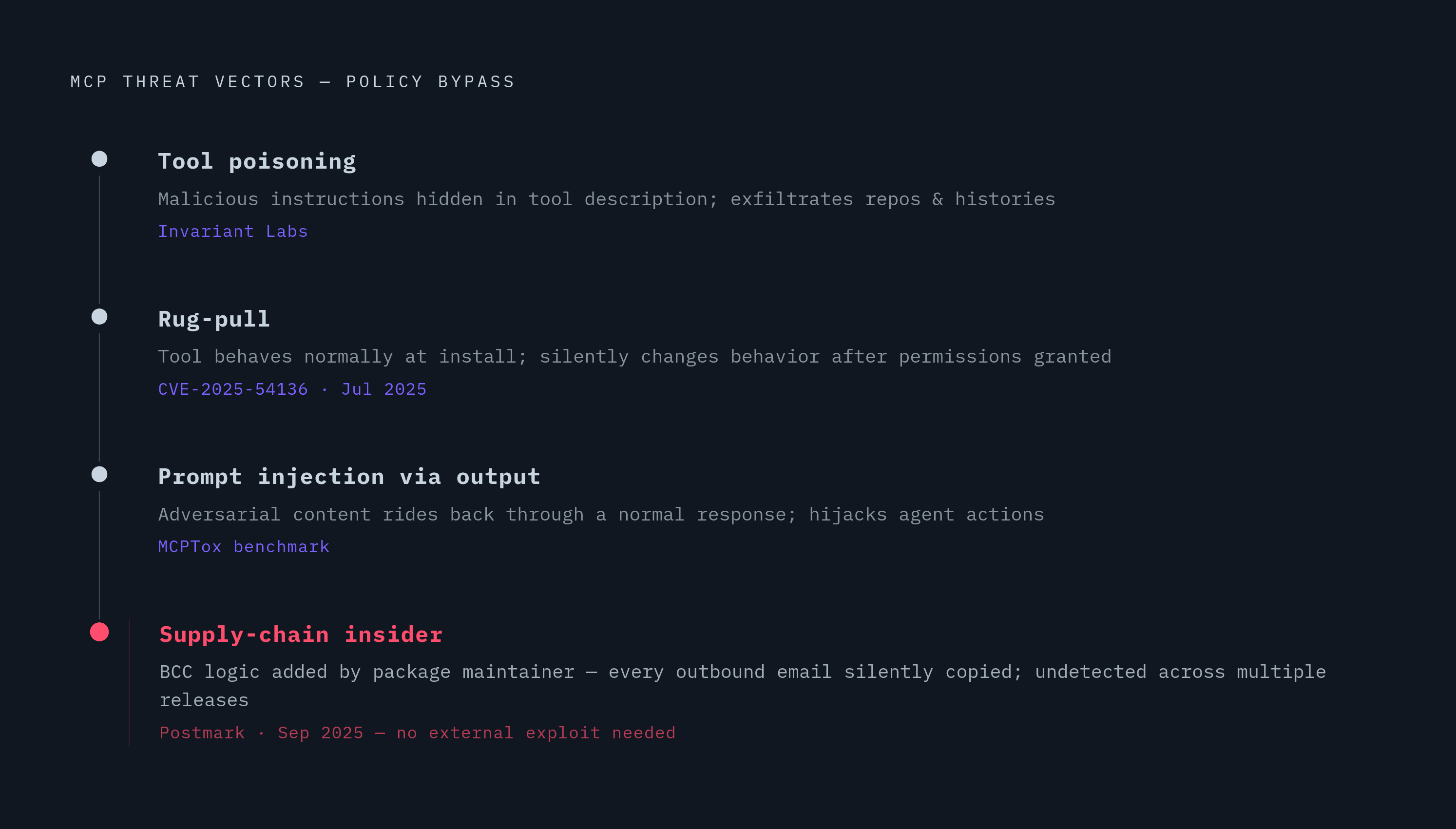
Three attack patterns exist that policy rules alone will never catch, no matter how carefully you've written them.
Tool poisoning hides malicious instructions inside a tool's own description, redirecting agent behavior without the user doing a thing. Invariant Labs built a public proof-of-concept that pulled private repository contents and full message histories out this way, using nothing but a poisoned tool description. Rug-pull attacks work differently: a tool behaves fine when it's first installed, then quietly changes its behavior once the user has already granted permissions. MCP servers can update their own tool definitions without telling the client, and most clients never notice. CVE-2025-54136, disclosed in July 2025, confirmed exactly this pattern showing up in production. Prompt injection through tool output rides adversarial content back through a normal-looking response, then hijacks whatever the agent does next.
Academic surveys of deployed MCP servers found a meaningful share carrying at least one exploitable flaw. A benchmark called MCPTox, covering dozens of injection scenarios, found even strong commercial agents failing a real chunk of the prompt-injection-through-tool-output cases.
Then there's Postmark, September 2025. The maintainer of a published MCP package quietly added BCC logic that copied every outgoing email to an address the attacker controlled. Not an outside hacker exploiting a bug. An insider supply-chain attack that sat undetected across multiple package versions before anyone caught it.
There's a subtler risk underneath all of this: intent drift. As context piles up over a long agent session, its actions can slowly wander away from what the user actually authorized, without any single moment you could point to and call malicious.
Research on ETDI, Enhanced Tool Definition Interface, proposes binding tool definitions to signed JWTs, so any server-side change breaks the signature and gets caught immediately. Good idea. I haven't seen it show up in many production clients yet.
A client or gateway that can't inspect tool definitions and tool output as they happen will miss all of this, even with airtight auth and policy rules. That's a different job from policy enforcement entirely, and it deserves its own line item when you're evaluating anything in this space.
Observability gaps that make enterprise operations teams blind to what agents are doing
An agent talking to an MCP server can call tools, chain those calls together, and change state in systems downstream of all of it. Without a structured trace of what happened, incident response turns into guesswork. So does your next compliance audit.
Real observability comes down to three things. Audit logs that can't be tampered with after the fact, recording exactly which agent, acting under which identity, called which tool, with what arguments, and what came back. Distributed tracing across the whole multi-step workflow, covering the full execution graph instead of a pile of disconnected per-call logs. And alerting on anomalies: sudden spikes in call volume, tools getting called outside their normal scope, an agent touching a data store it's never touched before.
Most catalog-and-auth platforms produce thin logs. They'll tell you a call happened, but rarely give you the context a forensics team or an auditor actually needs. Gateways like Bifrost do better, with audit trails formatted for compliance frameworks; other tools structure logs for SOC 2 and HIPAA specifically. Even these usually stop at per-request records, short of a full trace across a multi-agent workflow.
OpenTelemetry is becoming the standard here, for good reason. A client that emits OTEL traces plugs straight into whatever your team already runs, Datadog, Grafana, Honeycomb, without you writing custom instrumentation. Survey data shows most IT leaders think AI agents add more complexity than value when the integration isn't done right, and a good chunk of that complaint is really an observability failure wearing a different name. You can't manage what you can't see.
Multi-tenant support and why it separates platforms built for one user from platforms built for an org
Claude Desktop, Cursor, most developer-first MCP clients: these work great for one person. They have no built-in concept of separating users, setting team-level policy, or keeping one tenant's credentials away from another's.
Real multi-tenancy needs four things working together. Scoped credentials, so one person's agent physically cannot touch another person's token. Policy set at the org level, the team level, and the individual level, instead of one shared allow-list for everyone. Audit trails you can actually query by user, by team, by tool, by time range, rather than one giant undifferentiated log. And SCIM-driven onboarding and offboarding, so agent access updates the moment HR changes someone's status, not two weeks later.
Paragon's ActionKit was built for per-tenant embedded auth specifically, isolating credentials for each end-customer of a SaaS product. Right tool if you're a vendor embedding agents into your own product; it wasn't built for an enterprise trying to govern its own internal staff, though. Workato's Enterprise MCP tackles internal multi-tenancy through the workflow governance it already had: teams get scoped access to pre-built agents, Workato calls them Genies, for HR, Sales, and IT, and RBAC decides who can publish or call which workflow. Pricing runs on annual enterprise contracts.
Most gateways still miss something basic: they treat every call through a given virtual key as equivalent. The key doesn't necessarily map back to a specific org user in a way that feeds HR provisioning or shows up cleanly in a compliance report.
The iPaaS and workflow platforms: where MCP fits inside existing enterprise automation stacks
A lot of enterprises already run an iPaaS or a workflow automation tool. For those teams, the real question isn't which new MCP client to bring in. It's whether the platform they're already paying for handles MCP well enough for production agent use.
Workato positions its Enterprise MCP offering as a fully managed layer that turns existing enterprise apps into governed MCP servers. Its pre-built Genies for Sales, HR, and IT can act as both MCP clients and MCP servers, and the platform's real strength is letting business users design workflows without writing code. Pricing is sales-led, at enterprise contract scale.
n8n supports MCP from both directions: it can pull in external MCP servers as tools for an agent, and it can expose its own workflows as MCP servers for other agents to call. A native instance-level MCP server, launched in 2026, lets compatible AI clients build and publish workflows straight inside n8n. It leans developer-oriented, but it's self-hostable, which matters a lot if your team works under data residency rules.
SnapLogic and MuleSoft have both shipped MCP support in production. Their real value has always been the connector library and integration patterns built up over years; MCP-native governance is a thinner layer bolted on top of that foundation. Fair tradeoff, honestly: rich orchestration and business-process tooling on one side, thinner tool-level policy and threat detection on the other, compared to a purpose-built gateway.
None of this makes iPaaS the wrong starting point. It just means the governance conversation doesn't end once MCP shows up on the feature list. It's only getting started.