Local vs Remote MCP Servers and When to Use Each
Choose local for proprietary code, remote for shared team workflows, hybrid for both.
Model Context Protocol solved a real integration mess: before it existed, every AI model needed a custom-built connector for every data source it touched. MCP replaced that tangle with one shared protocol, and in December 2025, Anthropic, Block, and OpenAI handed it over to the Agentic AI Foundation under the Linux Foundation, with Google, Microsoft, AWS, Cloudflare, and Bloomberg backing it too. That's not a vendor experiment anymore. With 97 million monthly SDK downloads and more than 10,000 active servers running across Claude, Cursor, VS Code, and (with more limits) ChatGPT, Gemini, and Microsoft Copilot, this is infrastructure people are betting real workflows on. Once an organization decides to build an MCP server, the next question isn't optional: where does it run, and what does that choice cost in privacy, governance, and control?
How local and remote MCP servers differ at the protocol level
MCP has four moving parts. There's the host, the AI agent a person actually interacts with. There's the client, a protocol handler living inside that host. There's the server, which does the execution work. And there are the tools, resources, and prompts the server hands over. The host and client almost always sit on the same machine. The real fork in the road happens at the server: does it run locally, or somewhere else?
Two transport methods carry that split. Stdio has the client spawn the server as a subprocess right there on the machine, and the two talk over standard input and output streams. No network involved, no HTTP, just direct process communication. Streamable HTTP runs the server as its own independent service, and clients reach it over HTTP POST requests, sometimes with Server-Sent Events layered in for streaming. Streamable HTTP also opens the door to real authentication, bearer tokens, API keys, custom headers, the stuff enterprise systems actually need. It replaced the older HTTP+SSE transport, and SSE now shows up only as an optional piece inside Streamable HTTP or as a backward-compatibility fallback, not a standard on its own.
None of this is free. Streamable HTTP adds somewhere between 30 and 200 milliseconds of latency. For most enterprise workflows that's nothing. For a developer tool expected to respond instantly inside an IDE, this added latency makes the tool feel laggy instead of native.
What local MCP servers are good at
Local servers win when data needs to stay put. Files, IDE state, Git history, local databases, whatever a developer's machine already holds, a local server can touch all of it without shipping anything to a hosted service. The data never leaves.
That covers a specific, practical list of jobs:
- Reading select project files without uploading proprietary source code anywhere
- Surfacing IDE diagnostics and hooking into plugins already installed
- Talking to local dev servers and inspecting Git state directly
- Handling project-local memory or running safe checks that don't need network access
Healthcare, finance, and government teams often can't accept even encrypted transit to a third party, no matter how good the encryption is. Local is the only answer there.
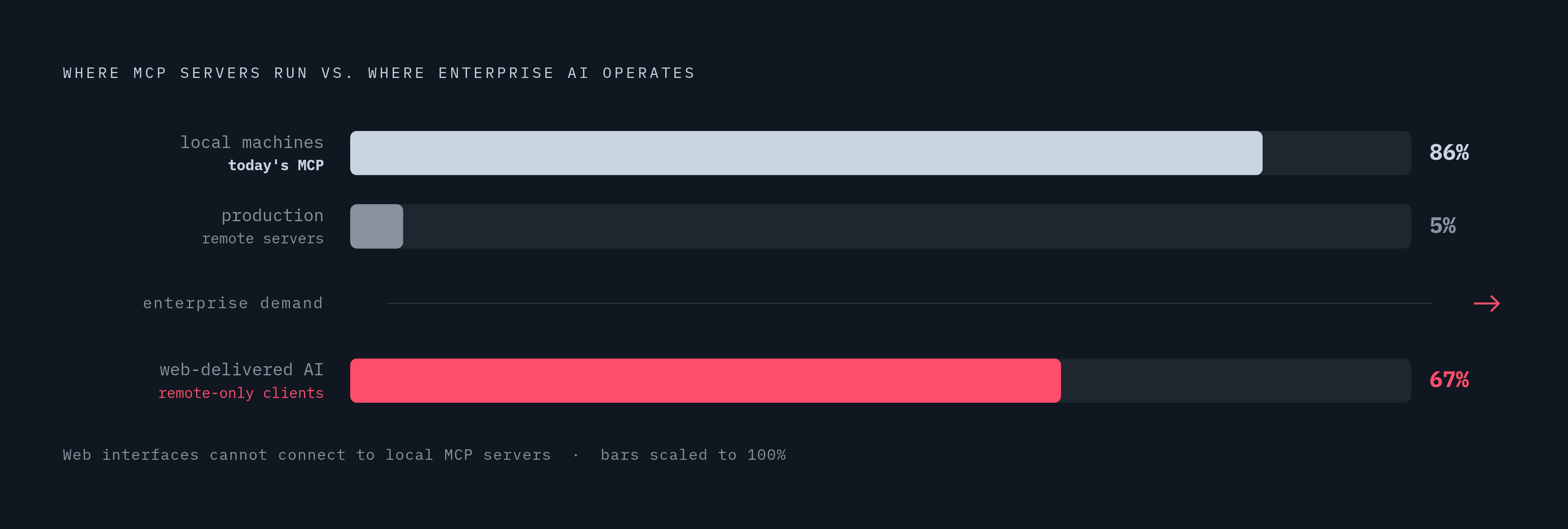
And the numbers back up how dominant this pattern already is. Clutch Security found 86% of MCP servers run locally on developer machines, with just 5% in production environments. MCP, in practice, still lives mostly on laptops. That tracks with its developer-first origins, but it's also just a good fit: if the underlying data is local anyway, the server works offline too, which matters for air-gapped environments or anyone working somewhere without a reliable connection.
What remote MCP servers are good at
Remote servers flip the logic: instead of every user running their own instance, one instance serves everybody who's authorized. No per-machine setup, no configuration drift between five different developers' laptops. Authentication, rate limits, audit logging, access control, all of it applied the same way, every time, for everyone.
That consistency is what these use cases need:
- GitHub issue tracking, pull requests, and code review pipelines
- Shared documentation indexes and internal knowledge bases
- SaaS analytics, billing systems, account management tools
- Customer-facing applications that need to survive unpredictable traffic spikes
Browser-based AI clients don't even get a choice here. They can only talk to remote servers, full stop, and with an estimated 67% of enterprise AI applications delivered through web interfaces, that's not a corner case. It's the majority.
Remote doesn't mean slow, either. TrueFoundry's MCP Automation Platforms for Enterprise found production-grade MCP servers hitting sub-10ms latency while handling over 350 requests. The network hop adds overhead, sure, but a well-built remote server still moves fast.
How hybrid deployments resolve the false either/or
Most real deployments don't pick one side. A single AI host commonly keeps a local connection open for proprietary code analysis while reaching out to remote servers for web search, messaging platforms, or SaaS APIs. The boundary between sensitive and general-purpose data gets enforced right at the connection level, tool by tool.
Local versus remote describes where the server process runs, not where the underlying data lives. A local MCP server that queries a remote database is, in fact, the most common setup today. The server sits inside the organization's own system boundary, but the data it's reaching for is somewhere else.
Remote MCP deployments have grown substantially since May 2025. Organizations that started all-local are layering in remote servers as their tooling matures, and this suggests hybrid isn't a compromise position: it's the direction everyone's heading.
That said, hybrid setups create a governance headache that pure local or pure remote configurations don't. Once an agent is connecting to a mix of servers, each with its own auth method, its own credential scope, its own logging behavior, an organization loses the single unified view of what that agent is actually doing and what data it's touching along the way.
The security risks that make deployment location a governance question
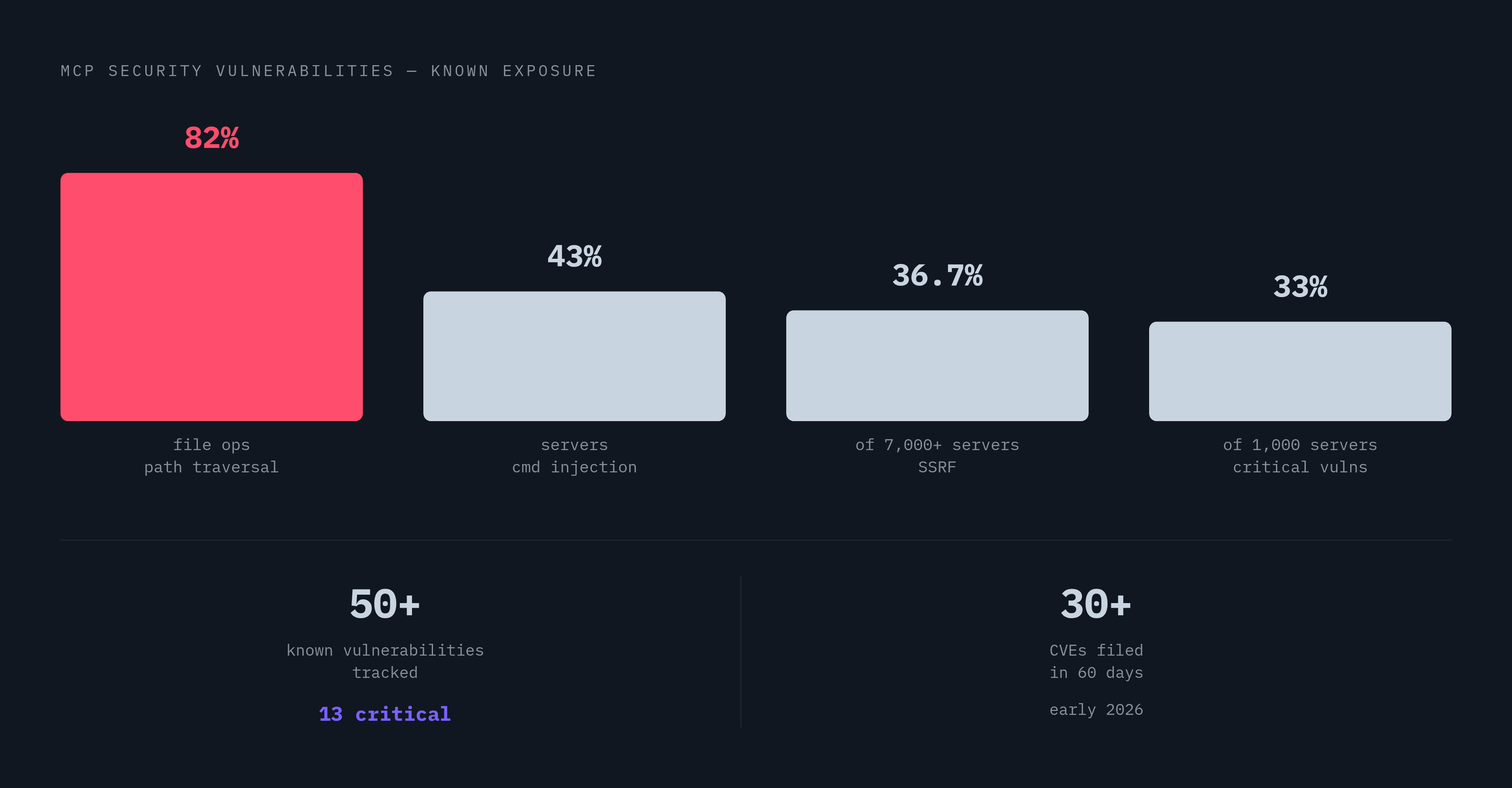
The vulnerability count isn't small. The Vulnerable MCP Project tracks more than 50 known MCP vulnerabilities spanning servers, clients, and infrastructure, 13 of them rated critical. In a single 60-day window in early 2026, over 30 CVEs were filed against MCP servers specifically. This is an active, ongoing problem.
Some attack patterns don't care whether the server is local or remote. Tool poisoning, sometimes called a rug pull, happens when a server ships a clean, benign-looking tool description when a user first installs it, the user approves it, and then the description quietly changes on a later connection. The MCP spec's June 2025 revision added tools/list_changed notifications to flag exactly this kind of change, but enforcement happens client-side, and it's inconsistent across clients.
Prompt injection is worse, and it's already happened in the wild. In the Invariant Labs GitHub MCP exploit, an attacker planted a malicious prompt injection inside an Issue on a public GitHub repository. When an agent read that issue through the GitHub MCP server, it followed the embedded instructions and exfiltrated content from private repositories the user had authorized elsewhere. The tool description itself was completely clean. The poisoning lived in the data the tool returned, which is a much harder thing to catch with a static review.
Supply chain attacks add a third angle. In the s1ngularity incident, an attacker exploited a bug in a GitHub Actions workflow to publish malicious versions of the nx build system npm package, which pulls roughly 2 million weekly downloads. The malicious postinstall script targeted AI coding tools and sought to harvest sensitive files and credentials from affected machines.
Simon Willison named the underlying pattern the "lethal trifecta": private data, untrusted content, and a channel for external communication. When all three sit together, prompt injection becomes a data theft vector, and most deployed MCP agents have all three, regardless of where the server happens to run. 43% of tested MCP servers are vulnerable to command injection, 82% use file operations prone to path traversal, 36.7% of over 7,000 servers scanned are vulnerable to SSRF, and 33% of 1,000 scanned servers carried critical vulnerabilities.
Auth and credential handling in local versus remote deployments
Local servers keep credentials close to home, usually stored right on the user's machine or tucked into a project config file. That means the user personally owns key rotation, and there's no shared store, no central place to revoke access if something goes wrong.
That's fine for one developer. It falls apart at team scale. Credential sprawl across a dozen or a hundred machines means no one has a single view of which keys are live, what scope each one carries, or whether a former employee's credentials got revoked on the way out the door.
Remote servers handle this differently by design. Streamable HTTP supports standard HTTP authentication methods, bearer tokens, API keys, custom headers, and the July 2026 spec revision tightened alignment with OAuth 2.1 and OpenID Connect conventions specifically. Most remote deployments lean on OAuth, where a user authorizes access through a browser, the provider holds and manages the credential, and permissions stay scoped and revocable from one central place. That's the model that actually supports audit trails, compliance reviews, and just-in-time credential issuance, none of which local storage was ever built to do.
The decision framework: matching deployment type to the conditions that govern the choice
The right deployment isn't a feature comparison. It falls out of honest answers to a short set of questions:
Where does the relevant data actually live, and is it acceptable for that data to transit to a third-party host, even briefly, even encrypted? Who's going to use this server: one developer working alone, a team, or the whole organization? What compliance or data residency rules actually apply here, and who's checking? Does the AI client that needs this server run inside a browser, which forces remote deployment regardless of preference? Who owns credential rotation and revocation, and is that a person or a system? And finally, does the organization need one unified audit trail across every MCP tool call an agent makes, or is per-server logging good enough?
Answer those honestly, and the deployment picks itself. A solo developer working on proprietary code doesn't need OAuth flows and centralized logging. A hundred-person team running customer-facing tools can't survive without them. The protocol supports both patterns equally well. The conditions on the ground decide which one fits.